If you’re running a high-traffic WordPress site on Cloudways Autonomous, you’ve probably noticed that our platform already handles scaling beautifully with Kubernetes based automatic resource allocation. But even with all that infrastructure power, there’s one area where we saw room for improvement: how your WordPress application talks to Redis for object caching.
That’s why we’ve added Relay as an alternative to PhpRedis for Object Cache Pro on Autonomous. But what does this actually mean for your site’s performance? And more importantly, should you switch?
Let’s break it down in plain English, then dive into the technical details for those who want them.
- The WordPress Caching Landscape: More Than Just Page Caching
- The Current Standard: PhpRedis
- Enter Relay: A Smarter Redis Client
- Our Internal Benchmarking Results
- When Should You Consider Switching to Relay?
- The Technical Details (For Those Who Want Them)
- Switching between PHPRedis and Relay
- Should You Switch?
The WordPress Caching Landscape: More Than Just Page Caching
Most WordPress users are familiar with page caching – storing complete HTML pages to serve repeat visitors faster. But for dynamic sites (think WooCommerce stores, membership platforms, or personalized content), you also need object caching.
Object caching stores the results of database queries and computed data in memory, so your application doesn’t have to recalculate the same information repeatedly. For a WooCommerce store, this might mean caching product information, user session data, or shopping cart contents.
On Cloudways Autonomous, we use Object Cache Pro (enabled by default and at no extra cost) with Redis to handle this caching. Redis is an in-memory data store that’s incredibly fast at storing and retrieving cached data. But how your WordPress application talks to Redis makes a significant difference in performance.
The Current Standard: PhpRedis
PhpRedis has been the go-to Redis client for WordPress applications for years, and for good reason – it’s stable, well-tested, and handles most caching scenarios effectively.
Here’s how it works:
- Your WordPress site needs some data (like product details)
- It checks if that data is cached in Redis
- PhpRedis sends a request over the network to the Redis server
- Redis responds with the data (or confirms it’s not cached)
- The data travels back over the network to your WordPress application
For most applications, this works perfectly fine. The network calls are fast, and Redis is optimized for quick responses.
But PhpRedis Has Limitations Under Heavy Load
During our internal testing on high-traffic Autonomous applications, we identified three bottlenecks with PhpRedis:
- Network Latency Accumulation Every single cache operation requires a round-trip over the network. Even if each trip only takes a few milliseconds, those milliseconds add up quickly when you’re handling thousands of requests per minute.
- Redis Server Bottlenecks Under heavy traffic, your Redis server can become overwhelmed with requests. Even though Redis is fast, it still has limits on how many operations it can handle simultaneously.
- No Local Memory Benefits PhpRedis doesn’t store anything locally in your PHP application’s memory. Every request for the same data requires another network call to Redis, even if you just requested that same data a second ago.
Enter Relay: A Smarter Redis Client
Relay takes a fundamentally different approach. It’s a modern PHP extension that does two things simultaneously: it connects to your Redis server (like PhpRedis does), AND it maintains a local cache in PHP’s memory for instant access to frequently-used data. What makes it especially powerful is that it’s asynchronous, multi-threaded, and lock-free.
What does that mean in practice? Relay can handle multiple cache operations at the same time without blocking, and it keeps frequently accessed data in your PHP application’s local memory for instant retrieval.
Here’s the difference:
With PhpRedis:
- WordPress needs product data → Network call to Redis → Data returned → Process continues
- Next request for same product → Network call to Redis again → Data returned → Process continues
- Each operation happens one at a time, and every request requires a network trip
With Relay:
- WordPress needs product data → Check local PHP memory first
- If data exists locally → Return immediately (no network call!)
- If data doesn’t exist locally → Fetch from Redis → Store in local memory → Return data
- Next request for same product → Found in local memory → Return immediately
- Multiple cache operations can happen simultaneously without waiting
The magic behind Relay: It uses server-assisted client-side caching, which means when data changes in Redis, Relay automatically invalidates the corresponding data in local memory. This ensures you always have fresh, accurate data while still benefiting from lightning-fast local memory access.
This intelligent caching architecture means frequently accessed data gets served from your application’s own memory at near-instant speeds, while Relay’s multi-threaded design ensures cache operations never become a bottleneck, even under heavy load.
Our Internal Benchmarking Results
We tested Relay against PhpRedis across multiple Autonomous applications with different traffic patterns. Here’s what we found:
Relay Consistently Outperformed PhpRedis In:
Cache Hit Efficiency: Relay achieved higher effective cache hit ratios by serving repeat requests from local memory without hitting Redis.
Memory Usage: Lower memory fragmentation and more efficient memory utilization within PHP processes.
Response Times: Faster WordPress cache response times, especially for frequently accessed data.
Redis Server Load: Significant reduction in network calls to Redis, allowing the Redis server to handle more total applications.
Overall Throughput: Applications could handle more concurrent requests with the same server resources.
When Should You Consider Switching to Relay?
Based on our testing and real-world usage, Relay provides the most benefit for specific types of applications:
High-Impact Use Cases:
Large WooCommerce Stores
- Stores with extensive product catalogs (1000+ products)
- High concurrent shopper counts
- Frequent cart updates and inventory checks
- Complex product filtering and search
Membership & Learning Management Systems
- Platforms like LearnDash, LifterLMS, or MemberPress
- User-specific content and progress tracking
- Frequent database queries for personalized experiences
- High concurrent logged-in user counts
API-Heavy & Headless WordPress
- WordPress used as a headless CMS
- High-volume API requests
- Decoupled front-end applications
- Mobile app backends
Dynamic Content Platforms
- News sites with personalized content
- Social platforms or community sites
- Applications with complex search and filtering
- Sites with real-time data requirements
When PhpRedis Might Be Fine:
- Simple brochure websites with minimal dynamic content
- Low-traffic blogs (under 10,000 monthly visits)
- Basic WordPress sites without complex database interactions
- Applications with minimal caching needs
The performance improvements from Relay are most noticeable under sustained load with frequent cache operations.
The Technical Details (For Those Who Want Them)
If you’re technically inclined, here’s how Relay works under the hood:
Shared Memory Pool
Relay creates a shared memory segment within your PHP processes where it stores frequently accessed Redis data. This memory is shared across all PHP workers, maximizing efficiency.
Smart Cache Invalidation
When data changes in Redis, Relay intelligently invalidates the corresponding local cache, ensuring data consistency while maintaining performance benefits.
Backwards Compatibility
Relay is a drop-in replacement for PhpRedis – Object Cache Pro doesn’t need any code changes to work with either client.
Memory Management
Relay includes advanced memory management features to prevent memory leaks and optimize garbage collection within PHP processes.
Switching between PHPRedis and Relay
We’ve tried making switching between PhpRedis and Relay as smooth as possible:
Applications created before September 30th, 2025
To switch to Relay for applications created before September 30th, 2025 you need to contact Cloudways’ support team as they would need to make an update to the wp-config.php file.

Applications created after September 30th, 2025
All applications created after 30th September 2025 come with Relay by default.
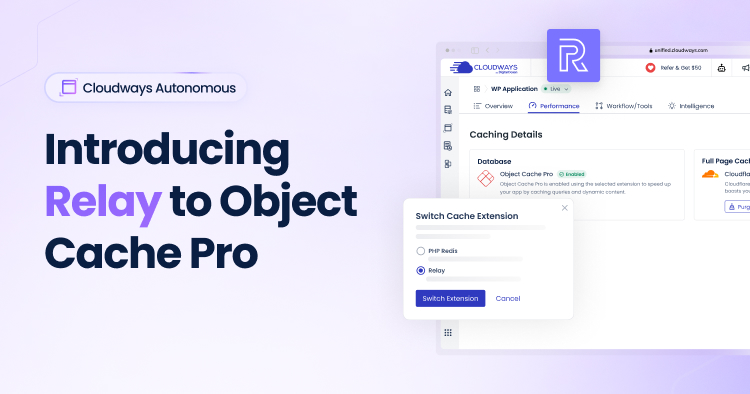
However, if you want to switch back to PHPRedis, you can do so by going into the Performance Tab -> Click on the editing pen under “Database”.
But Should You Switch?
Here’s a simple way to think about whether Relay makes sense for your application:
Consider Relay If:
- Your application handles 50+ concurrent users regularly
- You have complex database queries or dynamic content
- Page load times slow down during traffic spikes
- You’re running WooCommerce, membership sites, or API-driven applications
- Every millisecond of performance improvement has business value
Stick with PhpRedis If:
- Your current performance is meeting your needs
- Your application is relatively simple with minimal dynamic content
- You prefer the “if it ain’t broke, don’t fix it” approach
- Your traffic is predictable and low-to-moderate
The Bottom Line
Adding Relay to Autonomous isn’t about making PhpRedis obsolete – it’s about giving you options to optimize where it matters most.
PhpRedis remains a solid, reliable choice that works well for the majority of WordPress applications. Relay is there for applications that can benefit from its hybrid caching approach and need every performance advantage they can get.
The beauty of Cloudways Autonomous is that the infrastructure automatically scales to handle traffic spikes. Adding Relay to the mix means your application layer can be just as optimized as your infrastructure.
Ready to Test Relay?
If you think your application could benefit from Relay’s performance improvements, switching is straightforward. Our support team is available 24/7 to help evaluate whether Relay is right for your specific use case and assist with the transition if needed.
Questions about Relay? Contact our Cloudways support team – we can help you make an informed decision.
Hani Shoaib
Hani is a Senior Product Marketing Manager at Cloudways with over 3 years of experience in cloud hosting and SaaS marketing. She specializes in translating complex technical concepts into compelling narratives that resonate with agencies, developers, and businesses. Passionate about helping companies scale their digital presence, Hani brings a strategic approach to product positioning, go-to-market strategies, and customer education.