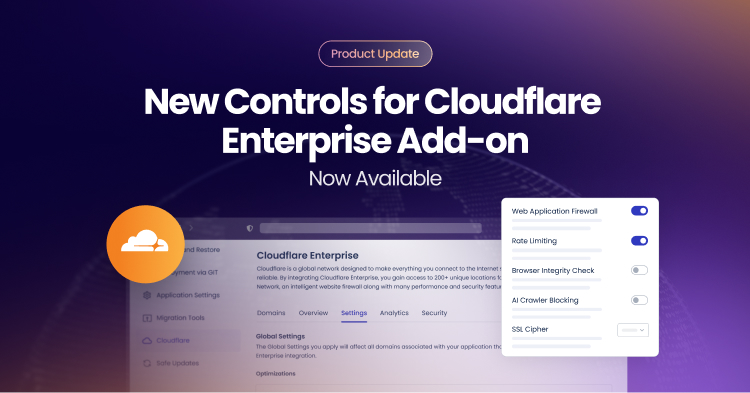
Cloudways has expanded the Cloudflare Enterprise add-on to provide direct control over key edge security and performance settings from within the Cloudways dashboard. Developers, agencies, freelancers, and businesses can now manage WAF, Rate Limiting, Browser Integrity Check (BIC), AI Crawler Blocking, SSL cipher modes, and hostname status refresh without contacting support.
For teams responsible for uptime, performance, and compliance, time-to-change matters. A blocked API request can interrupt a checkout flow. A traffic spike can trigger rate limits. A compliance review can expose encryption gaps.
These scenarios affect agencies managing client portfolios, freelancers maintaining ecommerce sites, and SMBs running revenue-critical applications. The new controls reduce dependency on support while preserving the managed hosting experience Cloudways is known for.
A Quick Overview of the New Options
To understand what has changed in practical terms, here is a breakdown of the new self-service controls.
Cloudways now allows changing the status of the core Cloudflare Enterprise controls from the dashboard. You can refresh hostname status in real time, toggle WAF and rate limiting, manage browserchecks, block AI crawlers, and select SSL cipher modes to help websites and applications better align with compliance and compatibility needs.These enhancements shorten troubleshooting cycles and give application-level control over edge behavior without adding infrastructure overhead. The following table summarizes the “before” and “after” capabilities of the Cloudflare add-on.
| Previous Workflow | Current Self-Service Workflow | |
|---|---|---|
| WAF, BIC, Rate Limiting | Submit support ticket → Wait for hours → Manual configuration by support team | Instant toggle in Cloudflare → Settings → Security |
| Hostname Status | Potential sync issues and manual verification required | On-demand refresh + automated sync ensures real-time accuracy |
| SSL Ciphers | Set to Compatible mode by default. One-size-fits-all configuration | Choice between Modern or Compatible (legacy support) mode |
| AI Crawler Blocking | By default, all AI crawlers were blocked through Cloudflare | Turn AI crawler blocking on or off to control AI bot access and indexing of website |
Reliable Domain Visibility with On-Demand Hostname Refresh
Domain management is rarely static. Developers push staging environments live, agencies migrate domains, freelancers switch DNS during rebranding projects, and SMBs update records when integrating third-party services.
When hostname status between Cloudflare and the hosting platform becomes misaligned, teams are left validating DNS records manually or waiting for backend confirmation. This can delay launches and create uncertainty during audits.
Cloudways now supports:
- Real-time, on-demand hostname status refresh from the Domains tab
- Automated scheduled synchronization running in the background

The manual refresh option allows immediate validation during deployments or troubleshooting sessions. Scheduled sync ensures that the dashboard reflects the current Cloudflare state without repeated checks.
For agencies, this generally means smoother client migrations. For developers, it typically reduces diagnostic time. For business owners, it can improve confidence that their domain configuration is correctly propagated.
With domain accuracy addressed, the next operational concern is managing how traffic interacts with the application.
Practical Edge Security Controls for Diverse Application Needs
Different applications require different security tolerances. A high-traffic WooCommerce store, a custom Laravel application, and a news blog have distinct traffic patterns and integration workflows. Previously, advanced Cloudflare security settings were fixed to default values, limiting flexibility across varied environments and applications hosted on Cloudways.
Cloudways now provides direct control over WAF, Rate Limiting, Browser Integrity Check, and AI Crawler Blocking from the Settings tab. These controls help align edge behavior with the operational realities of each application.
Web Application Firewall (WAF) Control
The Cloudflare WAF is designed to filter malicious traffic based on global threat intelligence. It is enabled by default to potentially reduce exposure to common web exploits.
In real-world environments, however, certain legitimate workflows can resemble attack patterns. For instance, custom PHP endpoints, webhook callbacks, or complex query structures may trigger false positives, especially when called programmatically.
With direct WAF control, you can temporarily disable edge-level filtering during troubleshooting or integration testing. This helps to reduce downtime and to accelerate diagnostics. Server-level firewall protection remains active, preserving baseline security.
Agencies benefit by resolving client issues faster. Developers can validate integrations without waiting on support. SMBs can avoid revenue loss from blocked legitimate requests.
It is important to reiterate that turning WAF off does not impact baseline server-level security of the Cloudways platform.
Rate Limiting Configuration
Rate Limiting restricts how many requests a single IP can make within a 60-second interval. If an IP exceeds 200 requests, Cloudflare applies managed challenges. The counter resets every minute and excludes verified bots, static content, and cached content.
By default, this capability is enabled to help reduce the impact of abusive traffic and sudden request/traffic spikes. So, in steady-state conditions, rate limiting can protect against abusive traffic.
However, during legitimate high-volume activity, it can disrupt operations in scenarios such as:
- Flash sales generating rapid checkout activity
- ERP or CRM systems polling APIs
- Automated performance audits
- Marketing campaigns driving sudden traffic bursts
With dashboard-level control, you can temporarily disable rate limiting during expected spikes and re-enable it once traffic stabilizes. This helps prevent unintended friction while maintaining the ability to reapply protective limits.
For agencies, this supports campaign execution. For freelancers, it helps avoid emergency tickets during promotions. For SMBs, it can protect revenue during peak demand.
Learn more about how to use the Cloudflare Enterprise add-on in our detailed guide on rate limiting.
Browser Integrity Check (BIC)
Browser Integrity Check evaluates HTTP headers commonly associated with abusive bots. It is designed to challenge or block suspicious requests, particularly those lacking standard user agents.
By default, this check is switched on. However, in some environments, legitimate legacy systems or enterprise software may use unconventional headers. This may lead to blocked access for business-critical systems.
Direct BIC control allows you to align protection with actual traffic behavior. Developers maintaining legacy integrations can help ensure continuity, while agencies supporting enterprise clients can prevent disruption to internal systems.
This flexibility helps strengthen operational stability across different use cases.
AI Crawler Blocking
AI companies use automated crawlers to collect web content for training large language models and powering AI search products. Some site owners value this visibility. Others prefer to restrict this automated data collection as part of their larger content protection strategy.
By default, the Cloudflare Enterprise add-on allows all AI crawlers by allowing the crawl option. However, you can now decide how AI crawlers interact with your application.
This control allows agencies to better align crawler access with client contracts or content licensing agreements. Similarly, businesses can restrict automated access to proprietary data and choose whether their content appears in AI-driven search results.
Note that this control cannot guarantee full prevention of site scraping. It provides structured edge-level control aligned with your content governance strategy.
Encryption Controls for Modern Web Operations
Beyond performance and availability, most organizations now consider encryption standards as part of routine operations. The updated Cloudflare Enterprise add-on extends user control into this area.
SSL/TLS encryption helps secure the connection between visitors and Cloudflare’s edge network. The cipher suite determines which cryptographic algorithms are used during that process.
Industries such as healthcare, fintech, and ecommerce have distinct encryption requirements. To support adherence to these requirements, Cloudways now offers two selectable modes:
Modern Mode
- Uses current high-security algorithms
- Supports stricter encryption standards
- May exclude older browsers and devices
Compatible Mode
- Supports a broader range of algorithms
- Maintains accessibility for older devices
- Balances compatibility with encryption strength
This control helps developers, agencies, and businesses to adjust encryption posture per application.
From Fixed Defaults to User Control
With hostname accuracy, traffic governance, crawler policy, and encryption configuration now configurable from the dashboard, the goal remains consistent: help reduce operational friction without introducing infrastructure complexity.
These enhancements expand the benefits our users derive from the Cloudflare Enterprise add-on. Agencies managing multiple clients can gain faster troubleshooting and deployment control. Freelancers gain autonomy during launches and campaigns. Developers gain diagnostic flexibility. SMBs can gain better alignment between security settings and business needs.
All these adjustments are available directly from the Cloudways dashboard at an attractive price point as compared with direct Cloudflare Enterprise features. Pricing starts from $4.99/application/per month. You retain managed hosting simplicity while gaining new controls to help you to respond to real operational scenarios in less time.
If you haven’t enabled Cloudflare Enterprise add-on yet, follow the steps in this knowledgebase article and see the new control features over the Cloudflare settings
Cloudways will continue refining platform controls to support real-world application management. If you rely on Cloudflare for edge performance and security, explore the new configuration options now and tailor them to your specific application requirements.
Zafar Iqbal
Zafar Iqbal is a Senior Technical Writer who's spent the last decade making server products, WordPress, and SaaS platforms actually make sense to people. As someone who lives at the intersection of tech and marketing, he loves turning complicated technical concepts into insights that help people make the right business decisions. When he's not demystifying managed hosting infrastructure, he's tinkering with his hobby projects.